


The echo 3068 as the name implies is a 68 key non RGB
mechanical keyboard that sells for around $99, I got this particular model from
gearbest.com and if you'd like to purchase one for yourself by the end
of this review checkout the link at the end of this article.
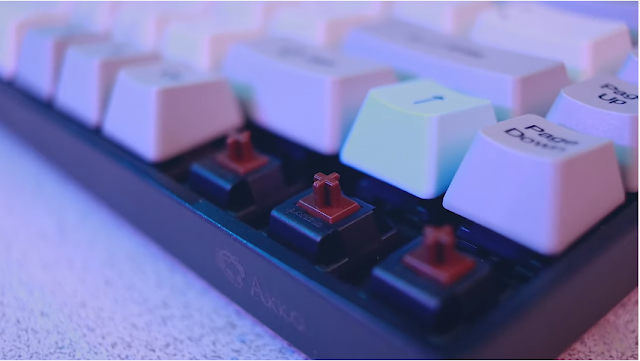
The blackbody and greyscale key caps with blue accents are a
striking combination and this is a 65% board which is incredibly space
efficient it has most of the keys you're normally going to use but none of the
fat there is no space between any of the keys, you even get dedicated arrow
keys and a full number row but if this is not quite enough for you there is a
slightly larger 84 key version which features a full function row.

It features 85% PBT plastic which is a higher quality plastic
than you'll traditionally find on your average keyboard it's less susceptible
to shine or discoloration and overall just a more durable material, the board
has true Cherry MX mechanical switches and comes in red blue and brown variants
and like many other keyboards I've reviewed recently this has a detachable USBC
cable but this isn't just for convenience the keyboard has its own internal
battery and connects via bluetooth 3.0 you can have up to three profiles and
connect across various devices and ecosystems.
The battery is 1800 milliamp hours which is a pretty decent
size especially considering there's no backlighting here it's not going to
consume as much as something like my original drivel caliber would which
drained its battery life in about three days, this will last 120 hours of
continuous use or so they say and up to 250 days of standby time and the whole
thing recharges via a thick but relatively short USBC cable.

Included with the packaging material is an additional set of
key caps you make the keyboard entirely grayscale or add pops of blue or purple
accents, subjectively speaking now this is one of the best looking keyboards I
think I've ever reviewed, now typically I do enjoy some tasteful well
coordinated RGB effects with my keyboard and just when I work in the darkroom
it's nice to have the letters backlit but for a keyboard that has zero RGB
effects whatsoever this thing definitely turned some heads and that font choice
is so unassuming that I almost forgot to mention it it feels like a high
quality product being very heavy and exhibiting virtually no flex however I did
notice that USBC connection gets disconnected pretty easily if you just bump it
it seems to disconnect and if you don't notice you could go several hours
without realizing your board isn't charging if you're still connected over
Bluetooth.
The key caps however are what really sets this board apart
and they are exceptional ,they have a slightly coarse texture all around and
feel like they have a bit more heft making more of an impact as you type ,the
edges also come to a much sharper point dye sublimated legends on the keycaps
provide unmatched protection against wear and tear meaning you'll never have to
worry about rubbing off the letters however they seem a little fuzzier than the
crisp edges you get from double shot ABS letters but honestly at this point
we're just nitpicking.

The 65-percent layout has quickly become my favorite layout
it has all the keys I need for 98% of the time and it has a footprint small
enough that I can easily just take it with me on the go and that wireless
connectivity also makes that all the easier.
The downside of this configuration is that it makes these
non-standard key cap sizes that could make finding replacements a little bit
more difficult than it would otherwise be ,however I can easily say these are
the best factory key caps I have ever used that in combination with the fact
that they include additional key caps with the packaging means you probably
won't have any desire to replace them.There are no flip-out feet on the bottom
but the board is angled a bit more aggressively than a normal keyboard would be
and the non-slip pads in combination with the added heft do an excellent job of
keeping the board planted.
I can probably count on one hand the number of keyboards
I've tested that have true Cherry MX mechanical switches the difference in
performance between the switch types isn't huge but the price difference can
sometimes be pretty big so it's usually more of a practical choice to go with the
budget oriented device and use more budget-friendly switches that's not to say
there is no difference cherry ,kale and Gator on are more of a high-end switch
and you can definitely feel that the tolerances are much tighter there is very
little variability between the keystrokes. The genuine Cherry MX switches and
phenomenal PDT key caps combined to create a remarkable typing experience.
The Bluetooth connection was about 98% reliable and the
range was pretty impressive at about eight or nine meters through several
obstructions ,however I was disappointed that it's only Bluetooth 3.0 the input
lag was definitely noticeable but not overly distracting I obviously wouldn't
recommend using this in a professional setting where every millisecond counts
but for a casual gaming word-processing standard computer use using a
wirelessly should function just fine for you ,if you do need to cut down on
that input lag time you can always plug in the keyboard where it will then
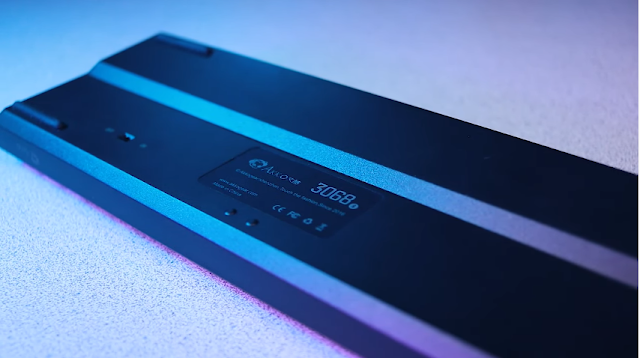
function as a wired keyboard provided you turn off the Bluetooth from the back.

The battery claims to get a hundred and twenty hours of
continuous use now it's tough to test a battery life that long reliably but I
can't say it easily gets me through a couple weeks of regular use without needing a fill up.
On paper a $99 keyboard that's missing almost half of its
keys and without any backlighting to speak of doesn't sound like much of a
bargain mif you're attached to the idea of a number pad or you're looking for
something a bit more luminous than I'd be inclined to agree ,however I can say
without a doubt this is the best typing experience I've ever had for under
tripled digits.
Akko 3068 Mechanical Keyboard Review
By Wadie Mendja

Welcome back to another article and today we're looking at a
budget-friendly gaming keyboard this one is the Motospeed Inflictor.
First of all you could tell that this has a pretty
cool-looking design it has some pretty cool RGB features this one's actually
sporting the blue switches, so for those who know mechanical keyboards you know
your blue switches your Browns your Reds now this does come in multiple colors
red ,rose gold and of course silver it has nine kinds of light effects, there's
a software allows you to actually control the individual keys so if you're
looking for one of those keyboards but you don't want to spend a hundred and
some dollars on a Razer BlackWidow chroma whatever this could be a good
substitute.

This does have 104 keys so your basic key layout plus it has
the nine key, I like having a nine key it comes in real handy when you got to
do something with numbers, now the keys themselves are double color injected
coating so that way you know it's gonna last longer it's not gonna wear out as
fast with any keyboard, especially for gamers especially with the WASD buttons
you'll see some wear and tear on those hopefully with this being double coated
that will take a lot longer.

And the keys themselves they're rated at 50 million
keystrokes also it has a gold plated USB plug that way it has a faster more
stable transmission.
So know let’s jump into our RGB test ↓
gaming keyboard , mechanical keyboard , computer keyboard , online keyboard
Get yours from Here ➥ http://bit.ly/MotospeedInflictor
Affordable RGB Gaming Mechanical Keyboard
By Wadie Mendja

Welcome to a new review today I have a very different
protocol that GOLE1 , when I first got this I was confused is this a
phone is it the tablet is it a TV box because it looks like all of those things
combined.
we have a screen we have speakers and onto the back we have
an HDMI output so it looks like a lot of things into one, on top of that we
even have a battery inside so you can run off the battery so very very
different , it can run Windows 10 or android 5.1, it has four gigs of ram and 32
gigs of internal storage you can get this with 64 and I do recommend buying the
version 64 because 32 gigs its not enough and speaking about price currently it
costs about $120 so its a very very cheap device for everything that we get because
you get a lot of things with this.

So first of all you’re gonna notice that we have a screen on
it its a five inch screen the resolution of 720p the viewing angles aren’t the
best but we do get the screen which is quite impressive we do have some
speakers there are quite loud and we have a power button and home button or the windows
key depending if you have Windows or Android on it and the volume
on up or down button.On TV site we can insert the TF card so an SD card we
have a USB 3 port a regular USB.

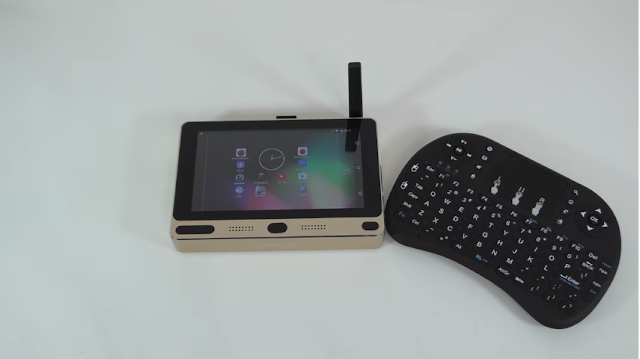
and on to the back we have the power adapter port the network adapter port another USB slot and a reset button and another USB port ,I’m using this for the wireless keyboard and a HDMI output in a 3.5 mm audio jack and you also have an Wi-Fi antenna which is very helpful.

So I have the version of 4 gigs of RAM and 32 gigs of
internal storage so the entire thing its made out of metal and I have to say
that it looks rather cool ,so the screen its actually a touchscreen so you can
actually use this without the keyboard ,I’m using the keyboard because its much
easier to use it for windows.
So what I want to do is connect this to the TV so I can
record on the screen, I'm gonna start up with Windows and I'll show you the browser and how
everything looks and then I'll switch to Android so I can show you more
benchmarks some gaming tests and so on. so check this out.
↓
Get yours from Here ➥ http://bit.ly/GOLE-F1
mini pc ,nuc ,mini computer ,mini gaming pc, best mini pc
GOLE GOLE1 5 inch Mini PC Review (Windows 10/Android 5.1)
By Wadie Mendja

If you're into cars and more specifically luxury ones (although that depends on the type of package) then you're probably aware that most if not all new models are fitted with leather seats that are both heated and cooled for use all year long regardless of season.Of course having heated and even cooled seats in a car can be very useful under extreme weather conditions but in a way the same can also be said about desk/office chairs especially since countless people spend many hours per day on them.
A division of Thermaltake Gaming, eSPORTS is committed to bringing the most personalized and the highest quality gear for the most competitive cyber battles, and advances the idea of products designed by gamers for gamers.

As clearly revealed by its name the E-Sports Gaming Chair with Steel Feet Support (currently available in red, blue, parchment and white) is largely based on the original X COMFORT Gaming Chair released by eSPORTS in late 2016 and which also happens to be one of the highest quality models to reach our lab (at least to date).

Product weight: 18 kg.
Product size (L x W x H): 125.00 x 70.00 x 48.00 cm / 49.21 x 27.56 x 18.9 inches.
gaming chair, best gaming chair , cheap gaming chairs,gaming chair ps4
Get yours form Here ➥ http://bit.ly/ESportsChair
E-Sports Gaming Chair Review
By Wadie Mendja

best wifi adapter , best wifi adapter for pc, best wifi adapter for gaming, best buy wifi adapter
Welcome to my review of EDUP AC1607 USB Wi-Fi adapter ,the last few months I test a lot of different USB Wi-Fi adapters because I want
to find some high-speed long-range USB Wi-Fi which is budget and compatible
with almost any operating system and I found this.
First let's take a look at the package the EDUP AC1607 comes
in a small square box and inside the box you are going to find the USB Wi-Fi
adapter the USB adapter antenna the CD with drivers and a user manual.

Now let's take a look at the USB Wi-Fi adapter ,the EDUPAC1607 dual band 2.4 and 5.8 gigahertz USB Wi-Fi adapter with 2 decibels
omnidirectional antenna the ,chipset is Realtek 8811 au which provides maximum
transfer rate of 600 megabits.
The EDUP AC1607 has USB 2.0 high speed interface but
also I tested on USB 3.1 3.0 and 1.0 ports and the Wi-Fi work good without any
problems, about compatibility the EDUP AC1607 is compatible with almost
any Windows starting from Windows XP and up to Windows 10 work under Linux and
is compatible with almost any Mac OS starting from Mac OS 10 point 6 slowly
operate an up to latest Mac OS 10.13 hike serie.

To set up the ID Wi-Fi adapter it's very simple if you are
Windows 7 or 8 user then you will need to install the drivers manually the
drivers you can install using the CD or you can download the drivers from the EDUP website but if you are Windows user than in the most of cases the drivers will
be install it automatically when I plug this USB Wi-Fi in my PC which running
Windows 10 than the windows start to download and install the drivers
automatically and the wife adapter was ready to use you know less than one
minute.
If you are using Mac OS to set up the Wi-Fi adapter it's
pretty simple also everything what you need to do is to download and install
the drivers from the EDUP website and after installing the drivers you
will need to reboot your computer.

Personally I got this Wi-Fi because on my PC I'm running
Windows 10 and Mac OS and this Wi-Fi is compatible with both windows mostly I'm
using to play multiplayer games and to be honest with this Wi-Fi I didn't feel
connection problems for disconnecting during gaming the Mac OS - always was the
biggest problem about Wi-Fi adapters because not all Wi-Fi adapters work under
Mac , previously I have used some other Wi-Fi adapters but when I'm going to
install some Mac updates in some cases I faced with connection problems and
always I need to reinstall the drivers the upgrades was the biggest problem
because for some Wi-Fi adapters there's no drivers I use this Wi-Fi in Mac OS
Sierra and after I upgrade to High Sierra everything was work rate without
reinstalling the drivers also after I do update from 10.13 to 10.13.1 everything
was working fine without any issues.
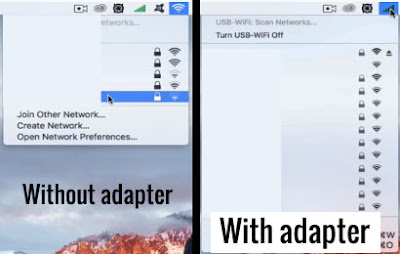
About the Wi-Fi adapters range the EDUP AC1607 has a
pretty long range sometimes I'm using this Wi-Fi on my laptop probably you'll
say the laptops already has a built-in Wi-Fi yes but I'm using the Wi-Fi adapters
because the laptops built-in Wi-Fi s-- has a little bit short range actually
I'm using the Wi-Fi adapters when I'm going to travel somewhere and when I need
the Wi-Fi connection I don't need to walk around we wrapped up in my hands in
search for better Wi-Fi signal I will just plug the USB Wi-Fi and I will have a
better connection and I will find more networks.
-Pros
and Cons:
1- Pros:
the EDUP AC1607 has a pretty good build quality and removable antenna
that means you can put a larger antenna if you want ,it's very easy to set up
and very budget USB Wi-Fi actually it cost around $10.
2- Cons:
I am not really sure because the Wi-Fi worked pretty good and I didn't face
with animal functions maybe the only cons is that the Wi-Fi is USB 2.0 but
however the Wi-Fi work great on USB 3.1 3.0 and the USB 1.0 ports.
Get EDUP AC 1607 Here ➥ http://bit.ly/EDUP-AC1607
EDUP AC1607 Best Budget USB Wi-Fi
By Wadie Mendja

In this article we're going to take a look at the best
budget gaming mice ,so I went in Gearbest and I bought those 3 gaming
mice that had high ratings and lots of reviews.
1-
Logitech G 300s :
This goes for $20 and it's an optical gaming mouse designed for
people with tiny hands if you guys have large hands like me do not buy this
mouse it's very uncomfortable , the cool thing about the G300s is the
extra buttons on top which are great for macros it will take some getting used
to but the software allows you to easily change the functions on there as well
as control the RGB lighting on the side, the mouse is really light so it's
easier to pick up during gaming but one thing I noticed while using the mouse
is that it requires a little more force than usual when clicking and they're
pretty loud too I do wish the added some type of texture for the scroll wheel
because it can get slippery if you have oily or sweaty hands but I don't know
it's a decent Mouse for tiny hands I give it a 3.5.

Get yours Here ⟾ http://bit.ly/logitechG300S
2- Reddragon
M711 :
first of the design it's way more comfortable and the
software is so much better than the M601,there are two DPI buttons on the top
to cycle through the sensitivity and the third button controls the RGB effects
but you do have more options to tweak the sensitivity and the lighting through
the software ,the mouse has a nice smooth surface with textured grips all
around including the scroll wheel ,the clicks provide great feedback and tracks
really well on both cloth and hard surface mouse pads I really enjoyed my time
gaming with this mouse and so far I would say it's the best gaming mouse on the
list I can't find any reason not to give this mouse a 5/5 well done Reddragon.

Get yours Here ⟾ http://bit.ly/RedragonM711
Motospeed
V30 :
I chose this mouse as it had a high rating on the website
and I was really interested to see what you’d get out of a $15 gaming mouse,
could all the high ratings be legit? The first thing I noticed was that the
mouse felt pretty good, a lot better than I was expecting considering the $15
US price point. The mouse weighs in at 142g, although the documentation says
169g and is 128mm long, 67mm wide, and 41mm high.On the left are the back and
forward buttons, with a hard plastic for the thumb rest and the same material
is also found over on the right hand side. On top are..Read More

Best Budget Gaming Mouse [According to GearBest]
By Wadie Mendja

Hello everyone today I would like to show you another product I have bought from GearBest.com and this time it’s a USB 32 GB pendrive which apart from the USB connection also features a micro USB connection.
Now let's take a closer look at the pendrive which as you
can see at the pic bellow has a black gloss metal cover which you can turn
around depending on where you are using it and the body is matte black with a
rubber like finish.
This is the USB 2.0 connection normal connection to connect
it to a PC while on the other side as I said is the micro USB connection which
is very convenient if you want to connect it directly to your Android device or
tablet.

I have been using smaller thumb drives and also, smaller
memory cards. I use a bunch of them because I have a bunch of electronics that
need them. I have a portable dvd player that plays movies off of a memory card
and thumb drive that my daughter uses in the car. I also take a ton of pictures
and videos on my phone and I am always swapping memory cards and sometimes,
they even get lost. This has a ton of space on it and it can be used with my
phone as well as my computer and other electronics. I have found this to be
very handy and I might even need a second one.
flash drive, micro usb
2 in 1 32GB OTG USB 2.0 Flash Drive Review
By Wadie Mendja

I have not been able to find Anything online that is
comparable to the cheap Korean monitor deal that I have today ,This is the crossover
fast 144Hz it’s a 2560 x 1440 IPS panel 144 hertz display ,eventually for 299
USD.
So first things first, lets have a look at what kind of
goods we get for our 299 U.S dollars! we get a remote , power cable Asian power
cord, and an adapter so adapt it to your North American plug we also get a
display port cable and our own tool and screws there - presumably assemble this
thing, this comes in more pieces than your typical Monitor stands, It’s got
also 4 HDMI ports ,one DisplayPort an audio passed through and a DC in Jack.
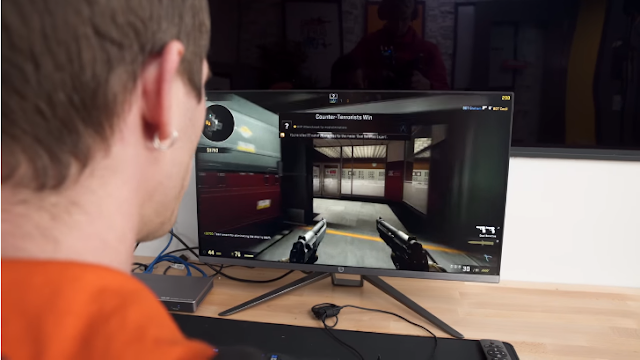
When I first tested this monitor (you can watch the test in
the video bellow) it was actually really impressive Like this is right up there
with Some of the lowest motion blur that I’ve seen on an IPS.
You can actually see it a little bit, Just how there’s no motion
blur There’s no streaking behind, I am really impressed with this thing
especially for the price.
Like this gaming experience has been available for a while,
but now the difference is that its cheap and to be clear 299$ is still a lot of
money But in the context of what we would have paid for this kind of an
experience before Its pretty affordable the only comparable things. I could
find was a 144 Hertz 1440p $300 monitor on monoprice, but that was a TN panel
and then for an IPS with those specs you were paying Quite a bit more.But its
got a lot going for it. I am super impressed for 300 bucks.
gaming monitor, computer monitor ,best gaming monitor, 144hz monitorCheck out the monitor Here: http://bit.ly/ForGameMK24FC
CHEAP Korean 144Hz Gaming Monitor | ForGame MK24FC 23.6 inch
By Wadie Mendja
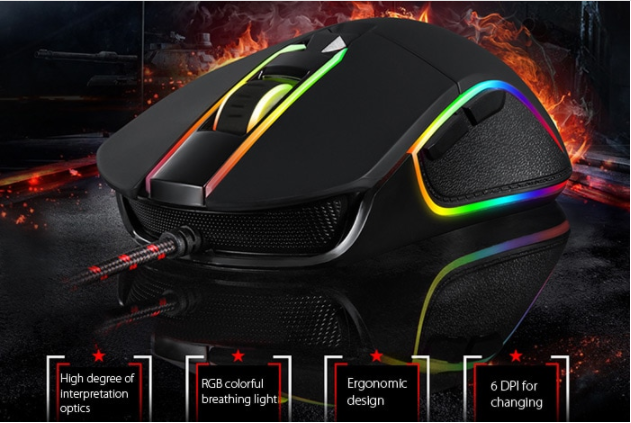
I chose this mouse as it had a high rating on the website
and I was really interested to see what you’d get out of a $15 gaming mouse,
could all the high ratings be legit?

The first thing I noticed was that the mouse felt pretty
good, a lot better than I was expecting considering the $15 US price point. The
mouse weighs in at 142g, although the documentation says 169g and is 128mm
long, 67mm wide, and 41mm high.

On the left are the back and forward buttons, with a hard
plastic for the thumb rest and the same material is also found over on the
right hand side. On top are of course the left and right mouse buttons which
use Omron switches, a rubberised scroll wheel, and DPI adjustment button. By
default the DPI button can be used to change between 500, 750, 1000, 1500,
2000, and 3500 DPI,however you can customize the increments through the
software, or completely remap the button if you want.
Towards the back is the Motospeed logo, which is illuminated
by the internal RGB lighting and it’s also runs around most of the mouse as
well, between the left and right click buttons and into the scroll wheel, and
personally I think it looks pretty nice.

On the bottom is a PMW3320 sensor, which I’ve found to work quite well, no issues there at all. There’s also a smooth plastic material toward the front and back to help the mouse slide around.

It will be interesting to see how that holds up after a
longer period but so far no problems after a few weeks of use. It plugs in via
the braided USB 2.0 type A cable, which is approximately 1.7m long. It’s
completely plug and play, you just plug it in and it’s ready to go. Although
not included with the mouse, or any information in the manual, there is a
driver that you can download from Motospeed’s website which allows you to
perform some customization with the mouse. It’s fairly straightforward to use.
There are 14 different lights that you can individually control, 7 on the left
and 7 on the right, as well as 5 different lighting effects. The static effect
lets you select colours and they will stay constantly lit. The breathing effect
lets you select colours and they will fade in and out. The neon effect will
change the colour of the whole mouse at the same time, so it will remain the
same colour at any one time. The recirculating water effect was the default
when I first plugged the mouse in, basically all the colours continually change
like a rainbow. The symmetrical flow effect is similar, except the lights
change from the back to the front together rather than all over the place. You
can also adjust the speed of the effects, and the direction, so lighting effects
can be reversed.

What I found cool was that when you change the lighting
effects or macro settings through the software they are being saved to the
mouse, so if you unplug the mouse and plug it into a different machine the same
settings will be ready to go.
You can also use the software to define macro keys, so
basically you can remap them to whatever you like, you just have to define the
sequence through the software. From what I can tell you’re getting a fair
amount of premium features at the $15 price point.
I’m honestly really impressed with this mouse, especially
considering the price of just $15 US dollars. The overall build quality seems
above average, and even the RGB lighting effect looks pretty cool, granted
that’s going to be pretty subjective. In any case I’ve been using it for a few
weeks now and I’m going to keep using it for the time being as it’s been great.
gaming mouse , best gaming mouse
Otherwise you can buy your own Motospeed V30 mouse from Gearbest.com here: http://bit.ly/Motospeed-V30 using the coupon code Coupon "AFF1110" to get 20% OFF
Motospeed V30 Gaming Mouse Review
By Wadie Mendja
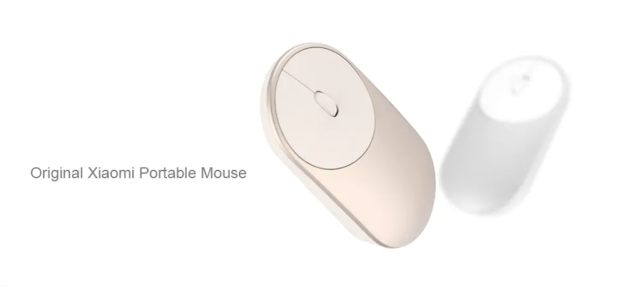
Xiaomi Portable Mouse it’s a wireless mouse
with suppose 2.4 GHz and Bluetooth 4.0 two ways connections. It's very small in
size and it’s going to use two triple-a size battery, there’re buttons
underneath it to switch from Bluetooth and through receiver.
If you want to use the 2.4 gigahertz connection you can
connect the receiver to the computer and click the mode button and make it go
green but if you want Bluetooth connection then you need to switch to the blue
light and for that you need to long press the mode key.
This Mouse uses a high-precision photoelectric sensor it's
not only makes the DPI up to 1,200 but also makes the mouse can be used on wooden
desktop and on fabric environment as well.
Now in my opinion the design is just perfect for hands
slight weight and very much comfortable but more importantly this mouse just
solved my problem because I have a laptop that has only one USB 3.0 port so I
wanted this port to be free and just for some data transfers and other purposes
so Bluetooth mode of this new Mouse just solved my problem so in my opinion the
biggest advantage of this mouse is supporting the 2.50 GHz and Bluetooth mode
connection, it's perfect for office working and absolutely recommended from my
end.
This incredible mouse got more than 1960 customer reviews on Gearbest with a rate of 4.8 ⭐, you can check it out from here ⟾ http://bit.ly/xiaomiMouse
Best Office Mouse | Xiaomi Portable Mouse Review
By Wadie Mendja

Today we are going to take a look at a budget mechanical
keyboard again and this one's pink this is the Motospeed K82 10 keyless RGB
mechanical keyboard that could quite possibly be the best budget RGB mechanical
keyboard I've ever seen so let's take a look .
So first of all what do you get in the box! ,well you get
the typical motospeed box with the keyboard inside a key cap puller if you want
to change the key caps and of course the manual.
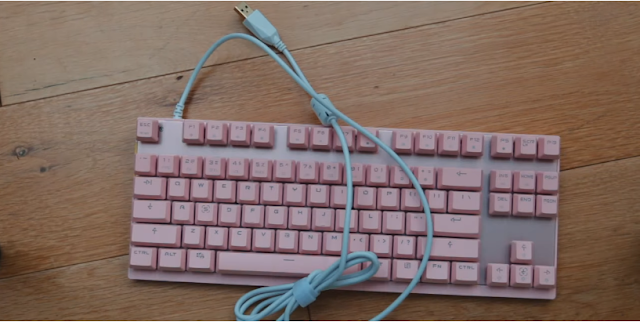
The K82 comes in two colors being pink and black I chose the
pink version but the black version does look super clean however I hadn't seen
a budget pink evil before so I went with that one.
Following this is the build quality the Motospeed k82 feels
pretty well built with solid abs key caps of a moderate thickness a rose gold
backplate and the keyboard itself overall has minimal flats, some I don't
really like though is the cable the k2 has a non-removable unbraided USB cable
and compared to the Motospeed ck62 which has a removable braided USBC cable ,this
is kind of disappointing.

The case is plastic but honestly at this price point that's
to be expected and it actually sits pretty nicely with the backplate if a
little different in color.
Next is the RGB lighting a key selling point for a lot of
people ,the Motospeed K82 features real RGB lighting that can be controlled by
other function keys which I will say isn't the most intuitive and there's still
no software on Motospeed apart to properly control this ,the LEDs can be set to
pretty much any color except weirdly white and that is a ton of fun modes if
you enjoy that sort of thing I personally like to keep mine in either a solid
ice blue or a slow RGB wave as a thing these are both a really amazing look on
this keyboard ,the colors are nice and vibrant and are consistently bright
again they're built into the PCB so this does make it difficult to replace them
but for such a low price I really can't complain that much.

Moving on to the switches these are again red linear switch
with 45 grams of actuation force and a clone of a cherry switch meaning that if
you want to replace these key caps with something custom as long as they fit a
Cherry MX switch they will fit these ,simply put the switches mean that this
keyboard isn't clicky and the key presses feel fairly light I've spoken before
how I think that out of all the cheap mechanical switches Alton we were
probably the best and in my experience I found them to be better than other
clones such as Kale notoriously scratchy but not quite as good as Cherry or
Gatoron so if I've actually found me out in Moretz to be pretty decent and
there's somebody who uses Lib gator on blacks on their main board he's honestly
aren't far inferior ,I have found the switches to be a little bit wobblier than
the cherry and Gator on alternatives but it's not to the point where it becomes
unusable speaking of stability the stabilizers on this keyboard are still clip
on which I have found to be more fragile and more rattling than other styles
such as screw ins ,they also do make installing custom key caps more difficult
but on the last Motospeed keyboard I tried which also have these they lasted
over four months with no issues.

Next we have the key caps again their abs a moderate
thickness which I personally prefer over PBT purely due to sound reasons
they're pink on my model and match really well to the case but I would have
honestly like to see them and why for that traditional mechanical keyboard
Sakura look that just looks so crispy.
So now I think we've reached a point in the review where we
should be hearing what this keyboard sounds like ↓↓ .
Overall for $40 I really do think that this would be a great
first step into the mechanical keyboard market for a lot of people and to those
people who want a real mechanical keyboard in a TKA layout with RGB for $40 I
totally recommend it.
If you don't need RGB then I would strongly recommend the
magic14 68 is it's got better stamps and a removable cable and if you're
willing to spend a little bit more than I suggest checking out the Motospeed ck6 - it has a removable cable and can be used wirelessly.
I had reviewed the magic14 68 before you can check it out Here.
Buy Motospeed K82 ⟾ http://bit.ly/MotospeedK82
BEST BUDGET RGB MECHANICAL KEYBOARD | Motospeed K82 Review and Soundtest
By Wadie Mendja

Hey guys thank you for tuning in efficient cheese today we
have for you the Tender Broadcom in a bold AC6 AC1200 smart dual band Wi-Firouter.
This router supports 4k Ultra HD video gaming and video
streaming whether it's through Netflix Hulu Amazon Prime or YouTube as well as
video gaming when you're broadcasting an Xbox or Playstation or your PC for
that matter ,I do a lot of broadcasting on my xbox and my PC and so far I've
had no issues when I switch to this router and the speeds have been very optimal
,now again when it comes to your speeds you want to have the router central and
a centralized location so that way it's not having to penetrate through a whole
bunch of walls to get a signal.
This router does have beamforming technology which allows
for the router to sing your device a direct stream of information for optimal
performance and it has Gigabit Wi-Fi for a super smooth internet experience
this does not have gigabit ethernet port ,so if you primarily use your routers
for hard wired connections this might not be the router for you if your ISP is
giving you anything over a hundred megabits per second .

The standards used on this router are : 802 point 11 a B G
in an AC AC band and latest standard it has one LAN port ,3 LAN ports ,4 v decibel
omnidirectional external antennas ,the data rate for wireless in is up to 300
megabits per second ,the standard for or the data rate for 11 C is up to 867
megabits per second.
Again it does support frequencies and 2.4 gigahertz and at 5
gigahertz ,the security on this router is going to be WPA or wpa2 PSK.
However, my previous router was a Netgear WDNR 3700 wireless
n router and that router served me very well but lately I've noticed that it's
not been able to hold the speeds that my ISP is giving me and the range on it
was not optimal for my situations especially with me doing a lot of
broadcasting and streaming.
In the 2.4 gigahertz band this router has optimum coverage
and the 5 gigahertz band it's not so much and that's with every 5 gigahertz
band router ,the problem with 5 gigahertz band frequencies is that they don't
penetrate as well as 2.4 so unless you're sitting in an area where it's an open
space you can have a lot of issues at times with range due to the 5 gigahertz
band not being able to penetrate through walls as efficiently as 2.4 ,this does
support 15 to 20 devices has a Wi-Fi on and off button ,a VPN server which is
awesome ,you can download the Tendo Wi-Fi app to control your router remotely
and it has intelligent power saving.
Now, I'm gonna go over the VPN server and why this is such a
big deal that this router has a VPN server , so I've been pricing a lot of VPN
routers and they were pretty expensive for the criteria I was looking for as
far as speeds and whatnot and this one was only $50 on GearBest ,this
particular router with the VPN server you can stay anonymous online ,so if
you're trying to stay anonymous because you stream off of Kodi ,popcorn TV or
Japan TV this would definitely be a great addition to your entertainment and
networking systems to help you stay anonymous online and enjoy the content that
you want to see, now I love the VPN server because I don't care what I'm doing
online and also I don't like to be tracked so that's a great feature.
netgear router, wifi router ,netgear nighthawk, wireless router
Tenda AC10 Wireless Router Review
By Wadie Mendja

As is typical when a new line of graphics cards gets
released there's this immediate focus on high-end with Nvidia pushing cards
like the 1080 and 1070 is having unparalleled performance while AMD's our X 480
was supposed to be a VR for the masses type product, but what about the humble
gamer without a bottomless trust fund bank account who just wants a solid 1080p
experience..
Let's have a look at Nvidia's latest offering for the
blue-collar members of the PC masters ,the GeForce GTX 1050 Ti .
So the GTX 1050 Ti is based off the same Pascal
microarchitecture as the rest of the GeForce 10 series but it uses the new GP
107 GPU and this is a bit of a change from the GeForce 9 series where the gtx
950 just ran a cut-down version of the gtx 960 s GPU ,with the 1050 Ti you get 768 CUDA cores with the 1392
megahertz on the boost clock as well as 4 gigabytes of gddr5 vram running on a
128-bit memory bus.

Although these cards aren't compatible with SLI you do get
other GeForce 10 standard features like Nvidia Ansel 4 cool screenshots as well
as support for DirectX 12 and Vulcan ,for our benchmarks we got two flavors of
the card the zotac gtx 750ti mini and the msi gtx 750ti OC both feature a
modest factory overclock with the zotac running at fourteen hundred and
seventeen megahertz on the boost clock and the msi running just a bit higher at
fourteen hundred and fifty-five .
Both of these cards are small form-factor and don't require any power beyond what the motherboards PCIe slot can provide in fact in our Crysis 3 load tests our system drew less than 160 watts from the wall in entirety while staying below about 60 ish degrees Celsius .


very interesting numbers if you're fighting size power or thermal limits in your current system, or are they ! .
Both of these cards are small form-factor and don't require any power beyond what the motherboards PCIe slot can provide in fact in our Crysis 3 load tests our system drew less than 160 watts from the wall in entirety while staying below about 60 ish degrees Celsius .
very interesting numbers if you're fighting size power or thermal limits in your current system, or are they ! .
To give a real answer we of course need to look at
performance in real games so here's how our 1050 Ti stacked up on our
core i7 68 50k test bench that we use for all of our testing to standardize our
results and eliminate bottlenecks, all tests were performed at 1080p as this is
a less powerful card that isn't really aimed at users going for 1440p or 4k .

Starting out with the after mentioned Crysis 3 which is
still a punishing title after over three and a half years the 1050 Ti performed
quite well for a card targeted squarely at the lower middle end of the market
it managed frame rates in the low 40s on very high presets while bumping things
down to hi delivers a buttery smooth experience at 71 frames per second.

Moving on to rise of the Tomb Raider the story was somewhat
similar with the 1050 TI managing close to 60 FPS on high settings while
very high will set you back about 10 frames ,DirectX 12 unfortunately didn't
help matters ,costing us a few FPS actually which has been a recurring theme on
the latest Nvidia set of hardware.


The much-anticipated battlefield 1 played very nicely with
both of our 1050 Ti scoring in the low 60s on Ultra settings performance
on the highest preset in Doom was similarly impressive with frame rates in the
upper 60s .


But although these numbers are quite good for a budget oriented 1080p focused card does that necessarily mean the card is a good value ,well that depends on how you define value.
If you go for strict dollars per frame analysis the gtx 750ti doesn't exactly come out looking that good as you can see on this graph below.
But although these numbers are quite good for a budget oriented 1080p focused card does that necessarily mean the card is a good value ,well that depends on how you define value.
If you go for strict dollars per frame analysis the gtx 750ti doesn't exactly come out looking that good as you can see on this graph below.

However many buyers looking for a graphics card in this
price range mostly care about just smooth 1080p performance at respectable settings
without any dunking around and right now the $140 GTX 1050 Ti is the cheapest
card that hits all these marks as it scored very close to or above 60 FPS at
high settings in all of our games and scored at least in the mid 40s or even
higher at the max presets .
Purchase ⟾ http://bit.ly/1050-Ti
GTX 1050 Ti Review - Impressive Budget Gaming Experience
By Wadie Mendja
Subscribe to:
Posts (Atom)


